
AI Practitioner
Welcome to jMM’s AI Practitioner Blog.
Posts

AI-Assisted Greenfield Software Development, Part 11: How Reference Data Was Executed with AI Subagents
How the final reference-data slices turned prior implementation work into parallel execution with AI subagents.
AI-Assisted Greenfield Software Development, Part 10: Implementing the ManageDegrees Reference-Data Slice
See how the ManageDegrees slice establishes a canonical degree catalog through narrow scope, validation, and persistence guarantees.
AI-Assisted Greenfield Software Development, Part 9: Implementing the ManageRanks Reference-Data Slice
Discover how to implement a canonical reference-data slice that supplies rank codes and access-level mappings to dependent features.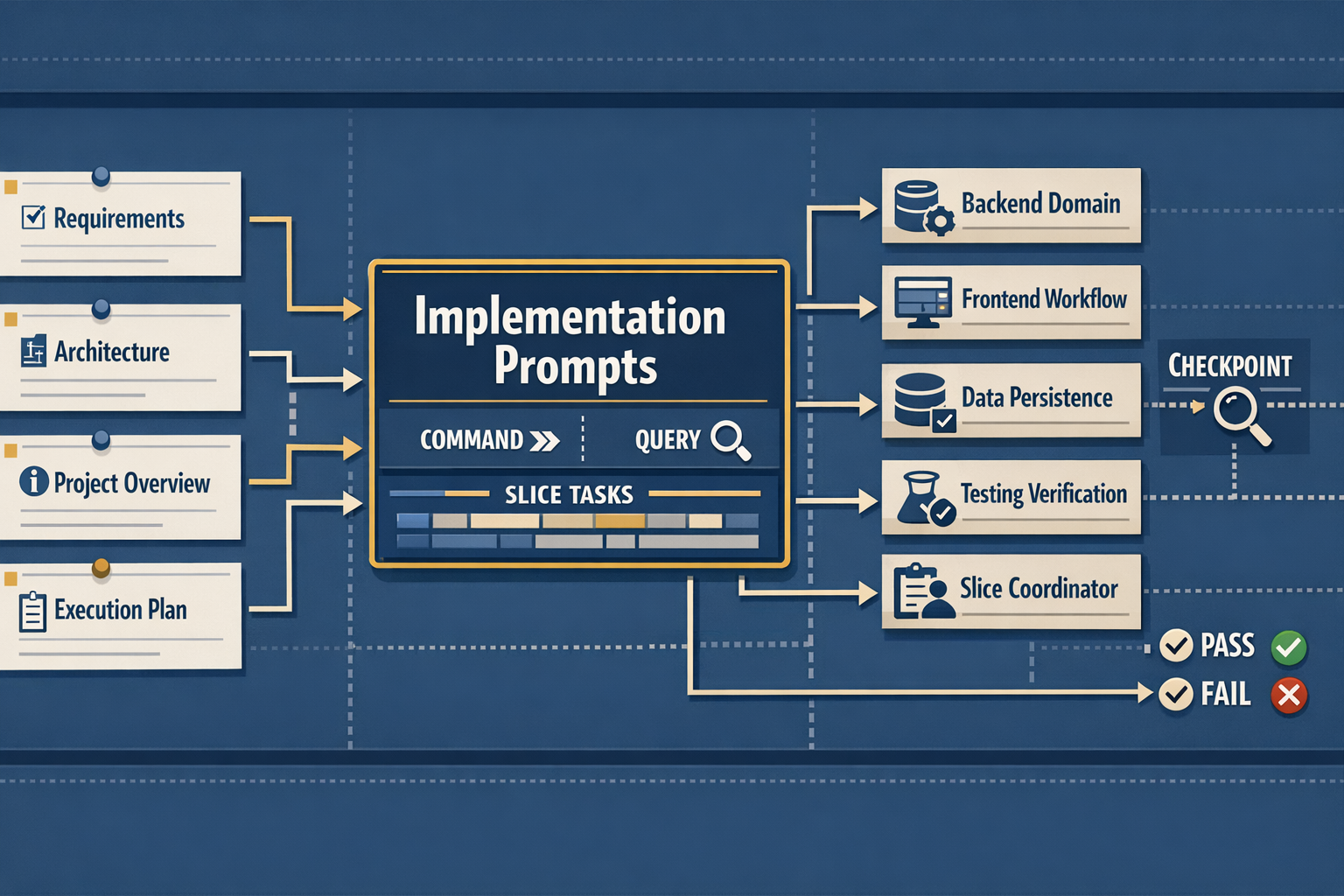
AI-Assisted Greenfield Software Development, Part 8: Durable Database Invariants
Part 8 moves beyond unit tests by requiring durable database constraints, committed migration artifacts, and sharper agent handoffs for foundational slices.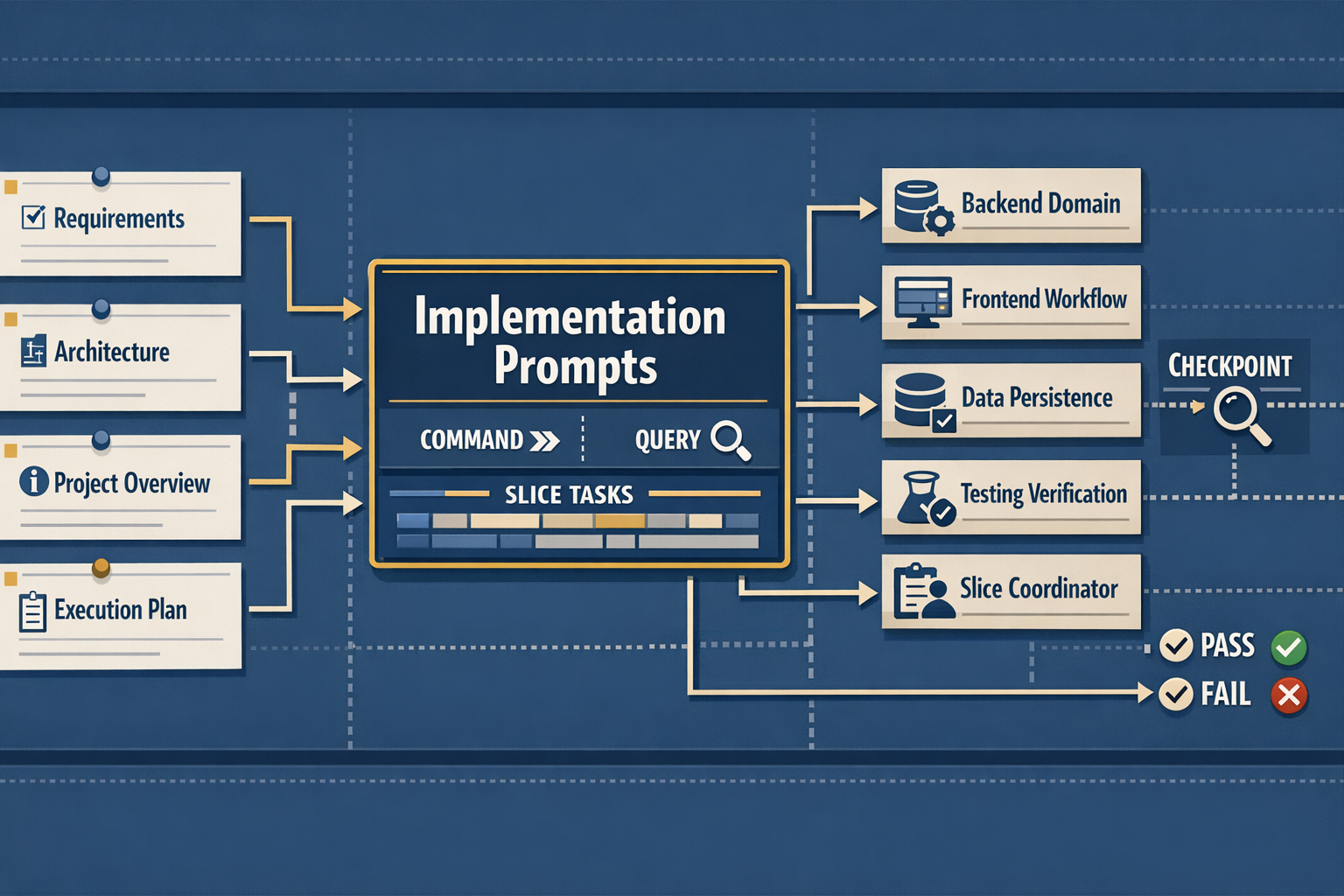
AI-Assisted Greenfield Software Development, Part 7: Implementation Prompts
Part 7 turns planning artifacts into execution-ready implementation prompts that coordinate agents, acceptance criteria, and verification across full-stack vertical slices.
AI Practitioner Resources: A Brief History of the Repository and Its Evolution
A chronological deep dive into the ai-practitioner-resources repository — from its inception as a static web viewer on October 29, 2025, through AI model migrations, modular refactoring, and the construction of an AI-powered project-management pipeline, all traced through 143 commits across four months.
AI-Assisted Greenfield Software Development, Part 6: Vertical Slices and Implementation Planning
Learn how to generate planning artifacts—vertical-slice definitions, workflow models, and dependency diagrams—that guide coordinated slice-by-slice delivery using AI and meta-prompts.
AI-Assisted Greenfield Software Development, Part 5: Technology Guardrails
In this post, I’ll shift from architecture-level instructions to technology-level instructions. This is where I’ll define the standards and practices that guide AI agents as they generate code-ensuring consistency, correctness, and architectural integrity across the entire solution.
AI-Assisted Greenfield Software Development, Part 4: Architecture Instruction Files
In this post, I’ll shift from project-level instructions to architecture-level instructions. This is where I’ll define the structural rules that guide AI agents as they generate code—ensuring consistency, correctness, and architectural integrity across the entire solution.

Welcome to the AI Practitioner's Blog
This is the retro-inaugural post of the AI Practitioner’s Blog. When I started the blog I jumped right into the content without a proper introduction. While I been in software development for many years, my only qualifications for writing a blog about AI is my experiences using the technology in anger creating real-world applications.
When I started the blog, my goal was to create a resource for professionals interested in the practical applications of artificial intelligence. By sharing my experiences I hoped to provide insights and guidance to those looking to leverage AI in their own projects and organizations.

AI Assisted Greenfield Software Development, Part 3: Generating the Process Instruction Files
This is the 3rd post in the series on AI assisted greenfield software development. This post builds on the first AI-Assisted Greenfield Software Development, Part 1: Business Requirements and subsequent posts. If you haven’t read these posts, you might consider starting there.
In Part 1 we defined the high-level business requirements and in Part 2 we started building out the scaffolding supporting AI code generation. In part 3, we’ll continue to add guidance for AI code generation. Starting with project guidance and process definitions, we’ll create prompts that create project overview instructions, AI code generation guidance, and Git workflow instructions.
What's the Big Deal?
A look at the revolutionary impact of AI on software development, comparing it to previous paradigm shifts in programming. This post explores how natural language coding is changing the way we build software and why this transformation is different from past technological advances.

AI-Assisted Greenfield Software Development, Part 2: Core Instructions
This is the second post in the series on AI assisted greenfield software development. This post builds on the first post AI-Assisted Greenfield Software Development - Part 1 Business Requirements. If you haven’t read that post, you might want to start there.
In this post I’ll cover the instructions, prompts, and chat modes I used to start to lay down the guidance for turning requirements into code. These files are critical for controlling the AI output and having a comprehensive set of instructions, prompts, and chat modes greatly increase the chances of getting AI to produce something usable.

Sharing Instructions with the Team
When working with GitHub Copilot across multiple projects, you’ll quickly face a common challenge: how do you share generic instructions (ie. coding standards and best practices) with team members working on different projects without duplicating instruction files in every repository? This post walks you through prompting Copilot to implement a solution leveraging symlinks and junction points.

AI-Assisted Greenfield Software Development, Part 1: Business Requirements
This post starts a new series on greenfield software development. The goal is to show the development of a solution starting with the initial context and adding to the solution incrementally. Hopefully you’ll get a sense for what it’s like to build real-world solutions with the assistance of Copilot.
In this first installment we’ll look at the initial context provided to Copilot. This will include the initial instructions and the first prompts submitted to Copilot.

Modes of Chatting with GitHub Copilot
In this post I’ll explore GitHub Copilot chat modes. I’ll cover the built-in chat modes and custom chat modes. We’ll dive into custom chat modes and look at some examples.
To be clear, when I reference Copilot, I’m referring to GitHub Copilot, not any other Microsoft Copilot-branded AI.

Developing User Interfaces with GitHub Copilot, Part 4
In the conclusion to this series on AI assisted UI development, I’ll have GitHub Copilot (GHC) add client-side sorting to a data table. If you missed any of the previous posts, you can find them here: Part 1, Part 2, and Part 3.

Developing User Interfaces with GitHub Copilot, Part 3
This post is the third installment in the series on AI assisted UI development. While this post is largely stand-alone, consider reading parts 1 and 2 before reading this post.
We’ve looked at using AI to create and add UI components in prior posts. In this post I’ll add a data visualization to a page.

Developing User Interfaces with GitHub Copilot, Part 2
Developing User Interfaces with GitHub Copilot, Part 2
This is the second installment of my series on using Copilot to implement user interfaces. It does build on the topics discussed in part one, so if you missed it you can check it out here.
In this article, I (well, Copilot) will expand on the implementation of the
owner-selectdrop-down by encapsulating the drop-down logic into a new vue component and then replacing the implementation on theActive Leads by Ownervue with the new component.
Developing User Interfaces with GitHub Copilot, Part 1
In the next few posts I will explore techniques for creating and maintaining user interfaces leveraging GitHub Copilot. Using real-world examples, I’ll show how AI handles making UI modifications. Including:
- Adding new controls to an existing page
- Creating components that can be shared with multiple pages
- Creating data visualizations
- Adding client-side sorting to data tables.

Adding Dependency Injection to an Existing Solution
Modernizing legacy code can feel like renovating an old house – you know the foundation is solid, but there are improvements to be made. This article explores how to improve the maintainability and test-ability of existing code by introducing dependency injection.
Sometimes when working with legacy code, the code is not as testable as you may like. Making the code more testable requires, in part, to loosen tight dependencies in order to reduce the scope of the code under test.

Test Generation Using GitHub Copilot
Using AI in a production application is risky, particularly if you are new to working with LLM-generated code. This post will show how you can get started using AI in a production application by leveraging AI’s ability to generate test automation.
If you’re hesitant to apply AI directly to a production codebase, that hesitation is well-grounded. Test automation is one area of your code that is begging for a little help from AI.
Unleashing the Power of GitHub Copilot in Visual Studio Code
In recent years, AI has been revolutionizing the way we code. One of the most exciting developments in this field is GitHub Copilot, an AI-powered code assistant developed by GitHub in collaboration with OpenAI. It leverages machine learning models trained on billions of lines of public code, allowing it to understand context and provide relevant suggestions. Whether you’re writing a new function or fixing a bug, Copilot is there to help streamline your coding process.
Boosting Developer Productivity with AI Tools and Effective Strategies
The phrase “developers will not be replaced by AI, they’ll be replaced by developers that use AI” underscores a critical shift in the tech industry. It highlights that AI is not a threat to developers’ jobs but rather a powerful tool that can enhance their capabilities. Developers who embrace AI can automate repetitive tasks, gain deeper insights through data analysis, and accelerate their coding processes.
subscribe via RSS